Use the numbered screen callouts and exact source paths below to replace the brand in both projects. Paths are relative to the package root. Keep the image dimensions and aspect ratio sensible and use artwork you can commercially redistribute.
1. Mobile logo, name and accent
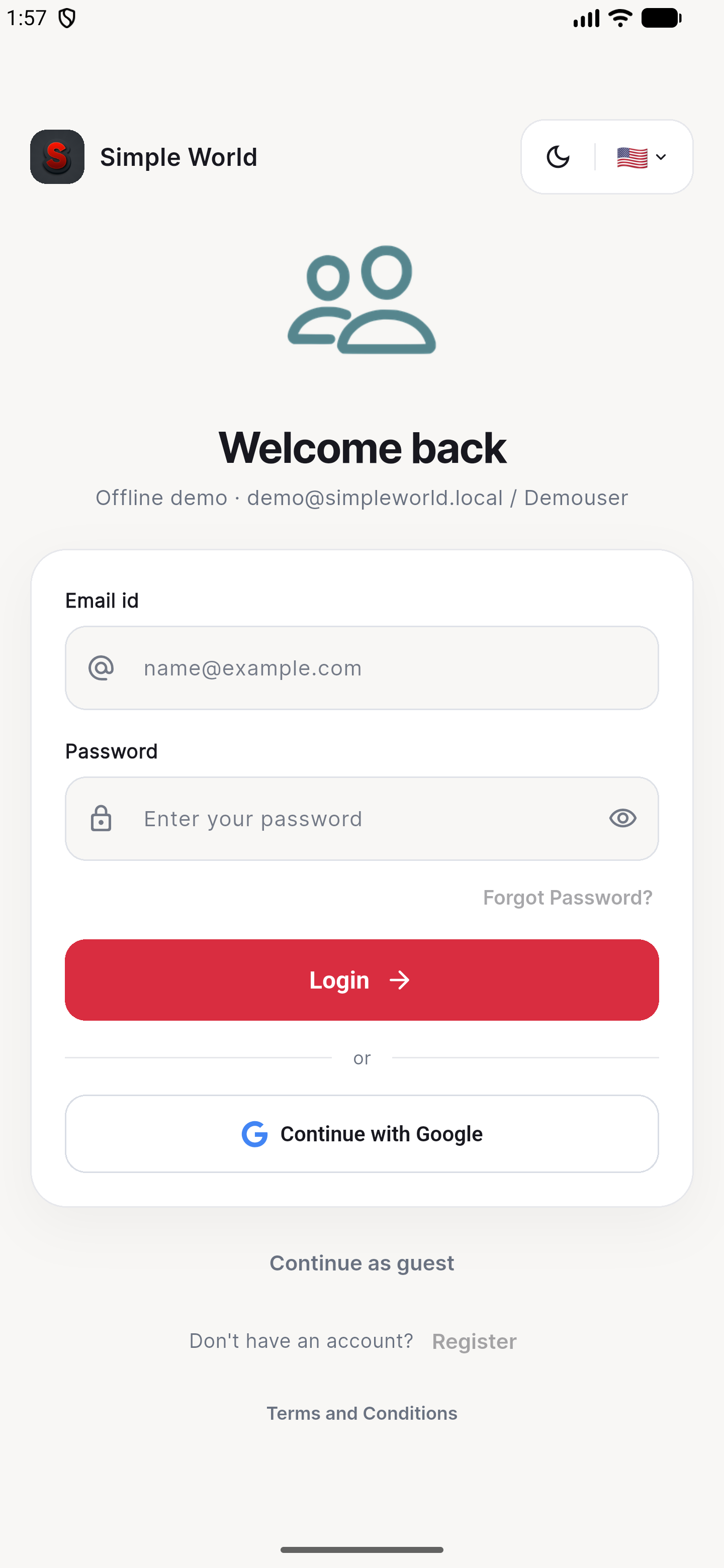 123
123| Screen callout | Edit here | What to change |
|---|---|---|
| 1. Logo | Source/mobile-app/assets/icon.pngSource/mobile-app/pubspec.yaml → flutter_icons.image_path | Replace the original PNG. Run dart run flutter_launcher_icons from the mobile project to regenerate Android and iOS launcher resources. The in-app auth headers already read this PNG. |
| 2. Installed app name | Source/mobile-app/android/app/src/main/AndroidManifest.xmlSource/mobile-app/ios/Runner/Info.plist | Change android:label="SimpleWorld", CFBundleDisplayName and CFBundleName. Keep package/bundle identifiers separate from the visible name and match your Firebase configuration. |
| 2. Visible in-app name | Source/mobile-app/lib/app.dartlib/pages/auth/login_page.dart, signup_page.dart, lib/widgets/auth_recovery_layout.dart, lib/pages/home.dart and lib/widgets/header.dart | Change the MaterialApp.title and the literal Simple World labels. Also review About, Help, legal copy, localized ARB files and iOS permission descriptions. The Flutter splash draws “S / Simple / World” in lib/widgets/splashscreen.dart; update those labels too. |
| 3. Light accent | Source/mobile-app/lib/config/palette.dart | Change Palette.primaryColor and secondaryColor. Neutral surface and text tokens are in the same file. |
| 3. Dark accent | Source/mobile-app/lib/theme/app_theme.dart → dark ColorScheme | Change the separate dark primary/secondary colors and keep readable text contrast. |
// lib/config/palette.dart
static const Color primaryColor = Color(0xFFD92D40);
static const Color secondaryColor = Color(0xFFBD806A);

// lib/theme/app_theme.dart — dark scheme
primary: const Color(0xFFFF7B87),
secondary: const Color(0xFFE1B19A),
Light primary #D92D40 Dark primary #FF7B87 Secondary #BD806A
A palette change does not recolor every legacy widget. Search the mobile lib folder for 0xFFD92D40, 0xFFB82234, 0xFFFF7B87, 0xFFBD806A and 0xFFE1B19A. Auth login/signup, recovery, language controls and older post/group widgets contain their own accent literals. Theme-tinted navigation icons follow the palette; baked-in bitmap colors require replacing the image.
2. Flutter web admin logo, name and colors
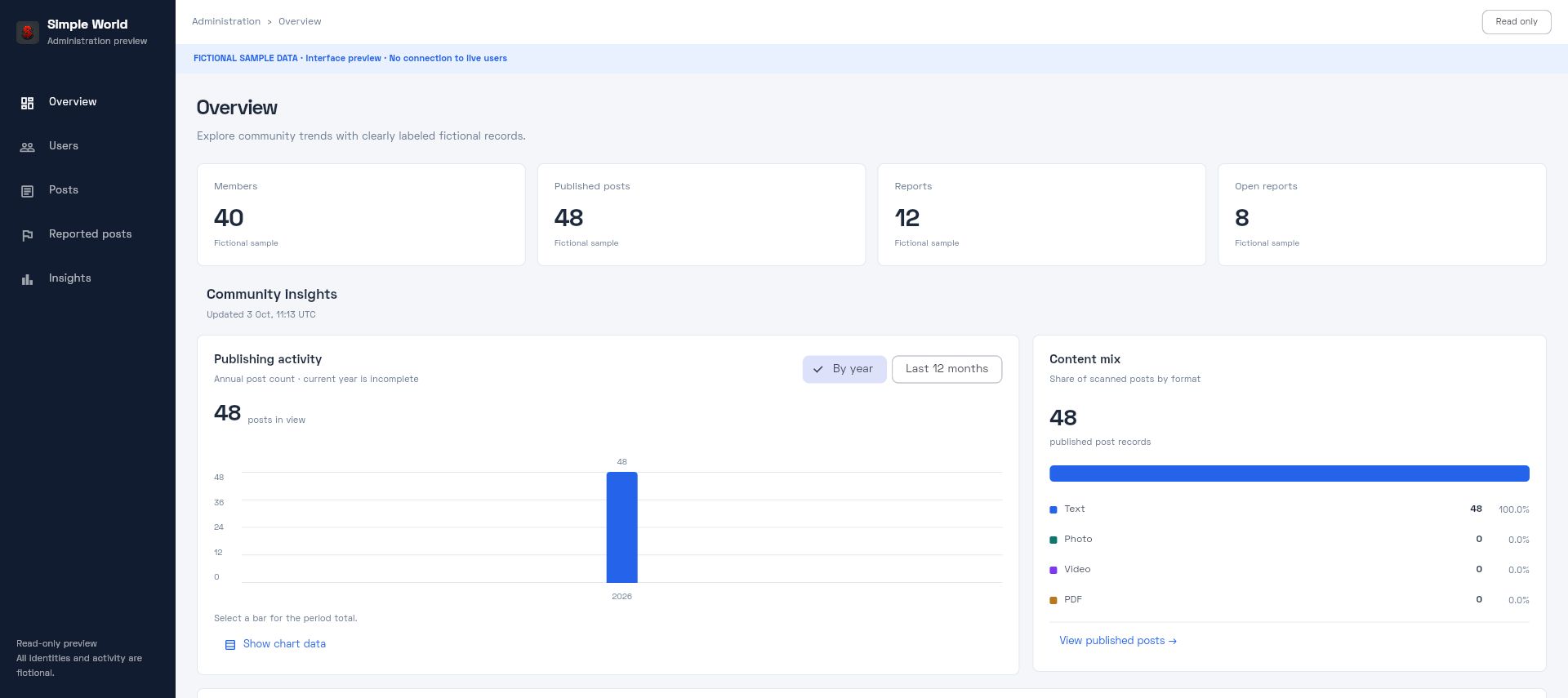 123
123| Change | Exact files | Notes |
|---|---|---|
| 1. Logo / favicon | Source/admin-panel/assets/splash_app_logo.pngSource/admin-panel/web/favicon.pngSource/admin-panel/web/icons/ | Replace each supplied raster bitmap. lib/screens/components/AdminArtwork.dart resolves the default logo. Preview-art mode requires separate optional assets and is disabled in the buyer edition. |
| 2. Name | Source/admin-panel/lib/utils/Constants.dart → mAppNamelib/screens/AdminLoginScreen.dartlib/screens/AdminDashboardScreen.dartlib/public_demo.dart | Update both app title and visible literal names. Also update the footer in AdminStatisticsWidget.dart and exported PDF metadata in lib/services/AdminExports.dart. |
| 2. Browser / PWA name | Source/admin-panel/web/index.htmlSource/admin-panel/web/manifest.json | Update the title, description, Apple web-app title, PWA name/short name and icon files. Browser metadata does not change sidebar labels. |
| 3. Theme | Source/admin-panel/lib/screens/components/AdminDesign.dart | Update adminAccent, adminCanvas, adminNavy, adminInk, adminMuted and adminLine. Keep adminDanger suitable for destructive actions. Older widgets also use lib/utils/Colors.dart. |
// lib/screens/components/AdminDesign.dart
const adminAccent = Color(0xFF2563EB);
const adminCanvas = Color(0xFFF4F6FA);
const adminNavy = Color(0xFF111C30);
const adminInk = Color(0xFF1E293B);
Admin accent #2563EB Sidebar #111C30 Canvas #F4F6FA
3. Rebuild the actual product
cd Source/mobile-app
flutter pub get
dart run flutter_launcher_icons
flutter build apk --release --dart-define=SIMPLE_WORLD_DEMO=false

cd ../admin-panel
flutter pub get
flutter build web --release
Configure your own Firebase project and signing key before a connected mobile release, and your Firebase web settings before the connected admin build. Inspect logo sizing, names, light/dark mobile contrast and desktop/phone admin layouts after customization. The admin source currently provides one active theme; this guide does not claim a separate complete admin dark theme.